|
My name is Theressa François. Have fun poking around! |
 |
Meaningful Assignment
NOVEMBER 24, 2017
I had quite the time analysing my province's Electronic Performance Support System, MapleForem.ca. There appears to have been very little activity on MapleForem since its launch in 2013. I hadn't even heard of the site until I went hunting for one as part of a research assignment in another course.
My analysis is quite detailed and there are plenty of problems with the site, but it's not all gloom and doom. I think MapleForem has some good features and solid architecture. It will take some talented programmers to code the features needed to turn this site around, including options for communication between members, a more intuitive interface, and a revamped search function. With these features in place, I'm confident that MapleForem still has the potential to become the much-needed resource it promised to be for Manitoba educators.
- Theressa
↻ BACK to TOP
Serendipity in the Departure Lounge
NOVEMBER 13, 2017

Yesterday, while waiting in the departure lounge for my flight to board, my husband's colleague stopped by to chat. I'd met him previously on several occasions, and the conversation flowed freely.
“Bob” soon asked what I was working on (I had been typing away furiously on my laptop). He was delighted to learn I was studying educational technology and eager to pick my brains regarding a problem he was encountering in the post-secondary institution where he works.
They were exploring options for launching an open EPSS system that would encourage mentorship and peer networking globally, while still offering courses and professional development opportunities to members. He felt that their current MOOC was inadequate, but he wasn't sure what they needed to do to encourage accessibility, visibility, timeliness and pertinence in this new EPSS.
His goals for an ideal EPSS sounded eerily similar to mine. While I'm hardly an expert at this point, I offered the following recommendations to bring back to the institution's steering committee:
- Allow members to create content. Let go of the notion that every item on the site has to be approved and vetted by a committee. Include 'certified' content, by all means, but keeping up with the needs and interests of users around the globe is impossible without a significant outlay of time and money.
- Prioritise approval and verification of users instead of their content. Verified users are unlikely to risk their professional necks by posting spam or offensive content.
- Allow users to rate each others' posts and flag any inappropriate content. Members are then given a rating based on the content they've posted. Members with higher ratings are considered 'experts' within their domains and are more likely to be sought out for advice or as mentors.
- Create a robust tagging function. Encourage posters to tag by field and subject matter, and create an algorithm that automatically tags posts by title and date posted.
- Allow members to create profiles and give them the power to curate the content that appears within their feeds by having them select the tags that are of interest to them.
- Provide a forum on each profile where users can respond to other members' questions without having to direct message or email each other. Allow members the option of deleting objectionable or dated forum posts.
- Build a robust search function into the system. Allow users to easily add and remove whatever filters they see fit to quickly zero in on pertinent content. This search function depends on good tagging etiquette to function properly (see #4).
- Do not assume that 'if you build it, people will come'. Publicise the EPSS at least until it has enough members to be self-sustaining. Keep a high profile in forums where potential members are likely to congregate and encourage them to join.
- Remind members to submit and to rate content (don't bug them too often, though) to keep the system timely. Hire extra people at first, or organise employees to submit quality content regularly, if necessary. Nothing kills a KM or EPSS like dated content
In a nutshell, I would suggest that this institution position itself as a content enabler and curator, rather than as strictly a content provider.
- Theressa
↻ BACK to TOP
A New Appreciation For Teachers Pay Teachers
NOVEMBER 4, 2017

I've been studying MapleForem.ca as part of my Meaningful Activity Project. There's a LOT wrong with MapleForem and I'll be going into great detail on this EPSS' failures in my paper on the subject due November 24th. Realising how much can go wrong with an EPSS or a KM system has given me a new appreciation for websites that get it right, however.
Teachers Pay Teachers is a website that I had often dismissed while working in the French Immersion system. I'd found some good English Language Arts resources there, and many of its math activities aren't language dependent, but most of the French language activities are destined for French foreign Language students in the United States, therefore limiting their applicability elsewhere.
There are nonetheless many activities on the website for French Immersion educators, and a robust searching and filtering system makes the process of finding them a lot less painful than on other sites (looking at you MapleForem!) Users can filter results by subject, theme, grade level, language and more. Adding or removing filters is easy too.
Contributing teachers maintain profiles, and users can quickly look up their other creations. Contributors are also rated by other users and there's even a forum for contributors to answer users' questions and correct any errors found in the materials.
While Teachers Pay Teachers isn't yet THE go-to resource for Canadian French Immersion teachers, it definitely has the potential to become so. Anyone designing an EPSS for educators would do well to imitate that site's architecture.
- Theressa
↻ BACK to TOP
The Curious Case of the Abandoned KM/EPSS System
OCTOBER 30, 2017

Back in September, my classmates and I were tasked with researching e-repositories available to educators within our provinces. I was very surprised to learn that the Government of Manitoba had, in fact, developed a Knowledge Management / Electronic Peer Support System for its educators. It was developed, tested and launched during my 7 years of service within my province's public school system, but I had never heard a whisper about MapleForem.ca until now.
At first, I was discouraged from signing up (not a good sign). Instructions on the English version of MapleForem suggest that teachers can only sign up with an administrator's permission. Since I'm not currently working at a school, getting permission could be a problem. Those instructions weren't apparent on the French side, however! I tried my luck and within 3 hours I had a profile on the site.
While awaiting my profile, I did some research on MapleForem. The website was officially launched in 2013. There are very few public links to the website, and references to it are frequently buried in older governmental reports and web pages. Only a few schools and/or educators have referenced the resource online.
Once my profile was approved, I started exploring the website. It is not easy to navigate. The navigation system can be confusing at first, but the bigger problems run deeper. It is impossible to view other users' profiles, or to even contact them through the website. My profile is very limited. I'm allowed to change my avatar picture, but otherwise I'm limited to posting my school, division, role, grades taught and subjects that are of interest to me. These options are drawn from pull-down menus - no personalisation allowed!
Users are invited to join groups, but they can't see the content of those groups unless they join them first. I had to join a number of groups to see if they were pertinent to me, and then drop all but a few once I'd had a good look around. None of the groups that interested me had posted anything past 2015. In fact, there has been very little activity that I can detect for over a year! At least one group used the website to post documents from a PD event last August, but it was a rare sign of recent activity on the website.
Posting documents on MapleForem is remarkably easy and straightforward. The website appears to support a wide range of digital formats and posters are invited to tag their material thoroughly prior to uploading. Searching resources is difficult, however. I couldn't find a way to search resources using more than one criteria or tag at a time. This is particularly frustrating if you're looking for grade 3 science materials, but you're limited to searching for either "grade", "3" or "science". There were no instructions or menus for filtering results.
I think MapleForem could be a useful resource for Manitoba educators, but the following changes will need to be implemented in order to resuscitate this KM / EPSS website:
- Allow users to personalise their profiles;
- Allow users to search each other;
- Allow users to communicate through the site;
- Allow users to explore postings before deciding to join a group;
- Improve search functions to allow for multiple search criteria and/or search filtering tools (grade level, subject matter, target language);
- Publicise the website to increase the number of educators active on the site;
- Remind and encourage members to keep posting so the site doesn't appear dated;
- Redesign the interface to make it less confusing;
- Redesign the website to appear more professional.
This list seems huge, but the architecture of the site has good foundations. Tweaking the site's design and adding functionalities more familiar to social media users would go a long way to improving its usefulness. More importantly, the designers of the site appear to have subscribed to the "build it and they will come" theory of website design. The vast majority of activity on MapleForem appears to have occured prior to and immediately following the website's launch before falling off. The designers apparently haven't invested very much in continuously improving the site or in encouraging users to post compelling, up-to-date content since then.
- Theressa
↻ BACK to TOP
My Brain Hurts!
OCTOBER 27, 2017

I'm currently taking 4 courses and the content is so similar across all of them that it all kind of mixes in my brain. Things I learn about lesson design apply to evaluation which then apply to knowledge management which then link to material I'm researching in my Memorial course...
It doesn't matter how often I print out instructions, write myself notes or add reminders on my phone - I frequently mix up assignment parameters and lessons! It can be hard to keep track of all the different currents that make up the larger stream that is educational technology.
At least I'm learning, right?
- Theressa (Image sourced here.)

↻ BACK to TOP
Social Media: So How Do We Harness This?
OCTOBER 13, 2017
I posted the following message (slightly edited) in the course discussions. I'm duplicating here as well as some suggestions made by classmates because I don't want to lose them when the course ends!
It seems as though every expert in education and instructional technology is saying the same thing: The world is changing and traditional teaching methods won't cut it anymore. But exactly how are educators supposed to best harness the power of social media to improve pedagogy? It would seem that SM's biggest strength is in its ability to motivate learners to contribute to a conversation and to facilitate communication and collaboration on a global scale. So how are teachers supposed to harness that power in the classroom?
A quick Google search for "how to use social media in your classroom" netted some practical ideas: (this is hardly a comprehensive list)
- www.gettingsmart.com/2016/05/5-ways-social-media-classroom/
- www.edutopia.org/blog/guidebook-social-media-in-classroom-vicki-davis
- www.teacherswithapps.com/10-great-ways-to-use-social-media-in-classroom/
- www.edudemic.com/how-to-use-social-media-as-a-learning-tool-in-the-classroom/
My favourite ideas from the sites:
- Ask students to blog
- Create a classroom Facebook account and connect with other classes
- Skype around the world
- Host a podcast or YouTube channel
- Create a Flickr photo project
- Tweet or post status updates as a class
- Brainstorm with Pinterest
- Create a class Wiki
UPDATE! One of my classmates responded with the following suggestion:
- Here’s the link to the eLearning article “How To Use Blogs In the Classroom”, it has great tips for starting a blog in your classroom. https://elearningindustry.com/how-to-use-blogs-in-the-classroom
-
Has anyone used edublogs? (https://edublogs.org/) - A. Leblanc
Thanks Amanda! - Theressa
↻ BACK to TOP
Looking for Educational Technology Journals?
OCTOBER 5, 2017
Wading through the panoply of online research regarding technology in the classroom (and online) can be daunting. I currently have access to Memorial University's excellent online library, but that likely won't be an option once I've graduated. A Google search turns up tons of research articles with the embedded search terms, but how can I know if the journals are legitimate and peer-reviewed?
EducationalTechnology.net to the rescue!

They call the list “partial” but I find it impressive nonetheless. I'm very pleased to see that they maintain the list (the last update was a month ago) and that they encourage users to report any broken links. The best feature, in my opinion, is that they vet the list and discard any predatory journals they identify.
Predatory journals (in case you weren't already aware) are those which invite researchers to submit their work while guaranteeing their studies will be published (for a hefty fee, of course). There is no peer review process whatsoever. Such “journals” prey on ignorant researchers or (worse) publish questionable studies by disreputable researchers who simply want to add a published study to their resumés.
Remember to check your sources folks!
- Theressa
↻ BACK to TOP
THIS Is What an eRepository Should Look Like!
SEPTEMBER 26, 2017
One of my assignments was to research digital repositories - websites where educators can access, exchange and curate educational materials. Some repositories also feature platforms for peer-to-peer networking and professional development opportunities. One of the assigned websites was PBSLearningMedia.org:

THIS is what I want to do for French Immersion educators and learners! The interface is intuitive and the material is easily searchable. You can limit results by grade, by subject matter and by media type. Users can even further refine results by choosing unit themes or by including resources created by other teachers:

One of the best features, in my opinion, is the student version of the site. It is visually appealing, sure, but more importantly, it allows students to access many of the same materials as their teachers, but organised and presented in a way that is more pertinent to them. What's more, students can complete assignments online (which must mean that teachers can organise an online classroom through this site), join classrooms and bookmark favourite resources:
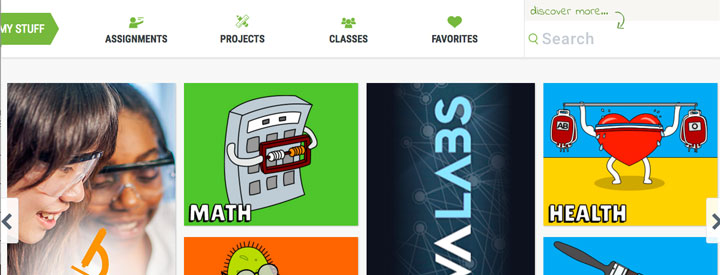
PBS did not create all the materials offered on the website. They have partnered with a number of established and trusted content creators (such as NOVA, Masterpiece, The Kratt Brothers, Frontline and Ken Burns, among others.) They also accept and vet materials created by educators, augmenting the number of resources available to classroom teachers and their students.
Insights gained from studying this website:
- I don't have to create everything myself! There are already some good resources out there for French-language students, but they're spread out over many different websites. Partnering with existing developers would be an excellent way of augmenting resources on the repository I plan on building. TFO (the Ontario French-language television channel) has a section on PBSLearningMedia.com with videos presenting the letters of the alphabet and a few vocabulary words in French.
- Materials must be properly organised and easily searchable. PBSLearningMedia has a robust system for seeking out resources based on grade level, subject and type. Once these are selected, educators have still more options for narrowing search results by unit theme and even further still. The materials on my repository must be properly tagged to ensure that users can find them according to a variety of search terms and categories.
- Curate the resources! When hunting for quality educational media online, there are few things more frustrating than having to wade through page after page of mediocre or buggy materials to find something useful. The repository for the Mimio whiteboard application is like this as was the repository at a school division where I once worked. I avoided both unless I was desperate for ideas. PBSLearningMedia have clearly taken the time to ensure that only the best quality, most pertinent resources have been retained.
- You can have the same database of resources, but present them differently for different audiences. PBSLearningMedia.org has taken the differing needs of educators and students into account by creating two different landing pages and search mechanisms for each group. The teacher website is all about finding media quickly. The student version is more about exploring and having fun. When I build a repository, I will want to include a section for francophone and francophile parents as well as for educators and students.
- Theressa
↻ BACK to TOP
A User-Friendly Guide to Knowledge Management!
SEPTEMBER 28, 2017
I lucked upon this website while researching videos explaining knowledge management (KM):

Knowledge-Management-Tools.net is a guide to KM created by Alan Frost. He holds master's degrees in economics and business administration from the Copenhagen Business School and he also runs a marketing firm. His master's thesis was all about knowledge management, and he created this website in order to share his findings as well as to keep pace with recent developments in the field.
The website content is very much concerned with the technical and logistical aspects of KM: what works, what doesn't, and why. There are detailed sections covering vocabulary, processes, organisational models and even careers in KM. At the end of the day, though, Mr. Frost agrees that “it is still true that KM is about people and human interaction...”
Mr. Frost also maintains a channel on Youtube. He doesn't post much, but the videos are informative and concise. The most recent ones were posted 7 months ago, so this may be a new endeavour for him. Here's a link to his YouTube channel: https://www.youtube.com/user/KnowledgeMT/videos.
- Theressa
↻ BACK to TOP
Wrapping My Head Around Knowledge Management
SEPTEMBER 21, 2017
When I first read the term “knowledge management” I had to resist the urge to roll my eyes. Was this just another example of corporate jargon along the lines of “learning curve” or “synergy”?
The more I read, though, the more I realise that knowledge management (KM) is A) not a new concept, and B) essential to the success of any organisation. KM is the act of artisans passing on their skills to their apprentices, whether they be master carpenters at Chartres cathedral, or professors guiding their students to particular articles and papers. The provincial curricula for schools are a form of KM. They ensure that certain topics are touched on, and that certain knowledge is passed on to students.
In my experience, lack of a formal KM system can slow the integration of employees - sometimes dramatically - into a new organisation. I spent 3 years collecting scientific resources and tools - sometimes at personal expense - for teaching Science classes at the elementary level, only to discover that my school maintained a library of resources for shared use. All that money and time would have been spared if only that small piece of information had been shared with me!
Moreover, organisations can find themselves lost and in the lurch when a long-time member leaves their position. Who do we call when the photocopier breaks down? Where do we store extra medical supplies? Who's in charge of scheduling volunteers? By what date do we need to book the stage? Even the seemingly most junior employee accumulates a large store of knowledge that can be easily lost when they leave.
Digital technology isn't Knowledge Management. It as a medium for imparting knowledge, like books, or videos or storytelling traditions. As the sheer amount of knowledge accumulated within an organisation grows, however, the need for technology that can organise, filter and store that knowledge becomes paramount. What company or organisation would want to print up encyclopedia only to have them become outdated the moment they came off the presses?
These are just first impressions regarding KM. I no longer roll my eyes at the term, that's for sure!
- Theressa