|
My name is Theressa François. Have fun poking around! |
 |
Makerspaces for All!
DECEMBER 1, 2017
I now understand why this blog was due in mid-November: All of my time and energy was focussed on my final assignments, making frequent blog posts impossible! I'm still recovering from several all-nighters, but I can honestly say it was worth it. I've learned so much!
This is my Makerspace project. Not only did I have to learn about Makerspaces, but I had to create a proposal convincing my school we should build one, too. Now that I've studied them, I'm convinced too! It's a great tool that's adaptable to so many subjects and themes. Below is a video of the Powerpoint presentation I made. If you prefer a nice, quiet read, you can download the annotated slides instead.
- Theressa
↻ BACK to TOP
Four (Mostly) Safe Francophone Social Media Sites for Kids
NOVEMBER 5, 2017
One of the best ways to learn a language is to use that language in a meaningful way by conversing with native speakers. For French Immersion and FSL students who can read and type effectively, social media can be a great medium for this sort of communication.
Following are a few popular (and mostly safe) francophone social media sites I found that cater to children and teens:

Le skwat is a hybrid social media/forum platform for children up to 17 years of age. The name doesn't sound very appealing in English, but in French the term translates more or less to "the hangout". It is a promotional website for the Télé-Québec media company. There are currently over 52 000 "skwateurs" registered with the site, the majority of them being from Québec or Ontario. Le skwat is accessed exclusively through web browsers and membership is free.
Skwateurs can post in forums, rate the website's online games, enter contests and respond to daily challenges issued by "Manu" the website's social media personality. All posts are premoderated by the site's administrators and the website is available exclusively in French. Users can not message each other directly through the site, unfortunately. User posts, profiles and submissions become the property of the website and may potentially be accessed by third parties.

Launched in 2012, L'univers de Wilby is a Québecois website that functions as a pre-moderated version of Facebook for children 6 to 12 years of age. Users can access educational games, e-books, publish online and communicate with each other using predefined messages. Members who have added each other to their "private circle" can exchange original messages. All posts are moderated before publication. Users can also download a 3D app developed for tablets and smartphones. Wilby.tv's operating language can be easily switched to English, which could prove problematic in a French Immersion of FSL setting. Most of the users in the chat areas were francophone, but activity has fallen off in the last few months.
Parents (and perhaps teachers?) of registered users can review their child's activity on the site. Registered users receive points for each interaction on the site. These points can traded against real-world items in Wilby.tv's online store - but only by users who have upgraded to a paid membership. Registration is free, but paid members experience an ad-free version of the site. VIP membership costs $5/month or $50/year. Membership for a class of 25 would add up to $1250 per year at those rates. According to Wilby.tv's privacy policy, absolutely no personal information is shared with third parties.

Disney's very popular Club Penguin Island website is known as l'Île de Club Penguin in French. It is a massive multiplayer online game that includes chat capabilities. Members must pay to fully access the site's social media features and all of its games and activities. Although players can change the operating language of the website, the process is somewhat complicated. This means younger students are likely to stick with the French-language platform. L'Île de Club Penguin is also available in iOS and Android formats.
Disney's policy regarding information sharing with third parties is complicated. In many cases, they promise not to share identifying information unless permission is given, while in other cases they say they will reveal said information to trusted vendors and to other divisions of the Disney corporation. Users complain that the current iteration of Club Penguin is not as engaging as its previous, Flash-based incarnation. Monthly subscription costs are currently $5/month - that's $125 for 25 students. The high price makes l'Île du Club Penguin hard to justify in a classroom setting.

At first glance, Woozworld.com does not look promising. The welcome page of this Québec-based website geared toward tweens and teenagers is stuffed with ads. Members willing to upgrade their membership to VIP status (8$+/month) experience an ad-free website, however. Users interact by selecting predetermined messages from a drop-down menu. Private messages between friends are filtered using artificial intelligence - not humans.
All interactions gain points for users that they can then spend in a virtual store. Users can purchase outfits for their avatars and decorate their virtual homes in this way. This makes WoozWorld more like a simulation game than a social media platform. Privacy controls are good, with Woozworld promising not to divulge any identifying information to third parties and limiting data collection to the email addresses and passwords associated with an account.
Users can very easily switch operating languages in Woozworld (there's a button at the bottom of every page). Students would need to be supervised to ensure that they are accessing the French version of the website during sessions. Parents and educators must also remember to turn off in-app purchases before handing over computers, smartphones or tablets as real money is easily spent in the store on accessories and upgrades. Reviewers complain that Woozworld's emphasis on purchasing results in online communications often revolving around gaining points and going to "parties". Some users have also reported issues with online bullying and hacking. These problems make Woozworld a poor choice for classrooms.
Discussion: There are no perfect options for Canadian teachers looking to use a pre-existing, moderated, child-friendly French-language social media platform in the classroom. Although they all offer the opportunity to communicate with native Francophones, the most attractive websites are either very costly (l'Univers de Wilby, l'Île de Clup Penguin), of poor quality (Woozworld) or lack important peer-to-peer communication features (Le skwat). Free memberships with Wilby.tv would be the best option for younger students while older ones would likely prefer Le skwat.
Teachers may nonetheless prefer developing an online classroom that has built-in chat and forum features, such as Edmodo, Google Classroom or even Facebook. Communication with French speakers might best be initiated in these cases by pairing up with a francophone classroom online for instant messaging, etc.
- Theressa
↻ BACK to TOP
Canadian Francophone Educational Websites & Games
NOVEMBER 4, 2017
Online educational games can be a great option for second language educators: Students are exposed to the target language, they are interacting and exploring in that language, and they're enjoying themselves so much they don't even notice they're learning! Games featuring plenty of audio can be particularly useful with young learners who either don't read yet, or whose French-language skills are still nascent.
While there are lots of online games in French, not all are appropriate to a school setting. Content might be inappropriate for youngsters, students might be exposed to online advertising or to content from France or other francophone countries which might be bewildering and unintelligible to Canadian learners.
Fortunately, at least three Franco-Canadian media outlets have developed vetted collections of educational games and videos for children from preschoolers to teens:

Radio-Canada is CBC's French-language equivalent. It maintains two educational game portals:
- ici.radio-canada.ca/jeunesse/prescolaire/jeux - Preschoolers and young children.
- ici.radio-canada.ca/jeunesse/scolaire/jeux - Older children and teens.
If you can read the text in the image above, you'll notice that the website also features videos, activities, contests and links to apps. Given how hard it can be to sift through app stores online (they don't filter based on operating language) a vetted list of applications is very practical.
Most of the games and activities revolve around the shows ("émissions") for obvious promotional reasons. A nice touch are the icons on the thumbnail images of each game. They indicate whether a game is tablet/smarphone compatible or not. Webmasters can link directly to each game should they wish to create a curated list of games for their students (here's an example I created ).

TFO is a Francophone television station and media group operating out of Ontario. Its website also features two French-language educational portals targeting different age groups:
- www.tfo.org/fr/mini-tfo - Preschoolers and young children.
- www.tfo.org/fr/jeux - Older children and teens.
The pre-K site is very intuitive and easy to navigate for young children and includes access to a large library of videos. TFO's older child/teen portal features a robust filtering function. Users can filter games by target age level and subject matter. Webmasters can link directly to games from this site as well.
My only qualm with this site is the "EN" button on the upper right hand side of the interface. Clicking on this button sends users to the English version of the websit. In my experience, French Immersion students prefer switching whenever possible as the English sites are less challenging for them to navigate. I prefer that the option to switch be hidden in a sub-menu or at the bottom of the page in these cases.

Télé-Québec is a Québecois television station. Its website contains exclusively French content. The pre-K area features three sections:
- toutpetits.telequebec.tv/zephir - Le monde de Zéphir (Zéphir's World)
- toutpetits.telequebec.tv/zephir?hub_jeux=true - Les activités (The Activities)
- toutpetits.telequebec.tv/zephir?zone_tele=true - Les vidéos (Videos)
All of these sections require the Flash Player plug-in, but an app is available for tablets and smartphones that don't support Flash. The interface features virtually no text once the Flash module has been launched and it can be hard to figure out what each image represents and where it might lead. The site's mascot, Zéphir, also has a bad habit of launching into really long introductions that users aren't allowed to skip through. Having games embedded in Flash makes them inacessible for linking.
The biggest feature of Télé-Québec's website might be their parent/educator portal. It features all the games organised by subject as well as the option of creating a parent/teacher account. Account holders can track up to 15 children's/students' activity on the website. No personal identifying information is required to register children.
Télé-Québec has an older child/teen forum and game portal at Le Skwat. It functions more as a hybrid social media/forum site and I will be reviewing it in a separate post.
- Theressa
↻ BACK to TOP
Voki.com: Students Listen, Write and Speak - in French!
NOVEMBER 3, 2017

A classmate recommended Voki.com in our Meaningful Activity forums. It's a computer-generated avatar that "speaks" using audio recordings or typed text. Users can upload audio files or record themselves directly on the website. I tried it out and in no time I was getting silly avatars (aliens, cats, Britney Spears) to "speak" in French! Text recognition was quite good, and the resultant speech was almost perfectly rendered. I was particularly pleased to see that Voki has included French Canadian accented voices for their type-to-speech option. Some of the accents from France can be unintelligible to Immersion students, so this is a big deal.
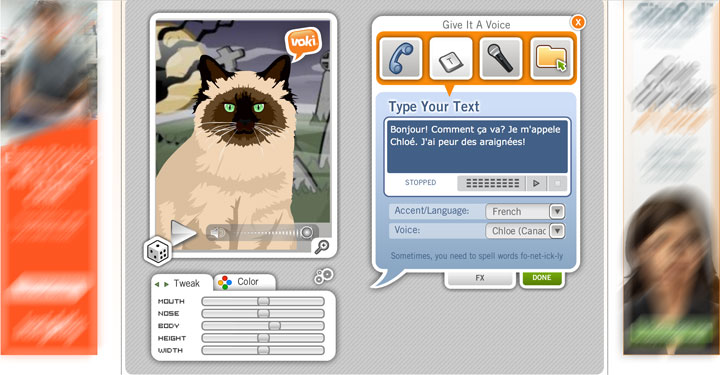 |
| Voki favours icons over text for the interface, making it easy to navigate. Yes, those are ads on either side of the screen. Ads are removed for paid subscribers. |
I think this is an excellent tool for French Immersion and FSL students. It's easy to navigate, it's fun, and it gets students listening, speaking, and writing in French! What's more, students don't need a huge, uninterrupted period of time on the computer (or on a tablet or smartphone) to get results quickly. I love that students don't even need to register for an account in the classroom option - no privacy issues! Teachers can create assignments and review their students' work through the app as well. They can also post students' work and publish it publicly (or not).
Voki features a classroom option for subscribing educators. Teachers can manage classes, assign projects and review assignments through the Voki classroom interface. More information is available at http://www.voki.com/classroom/index. Prices are reasonable, in my opinion. A teacher would have to pay $40USD for a yearly subscription covering 30 students or only $5USD/month for short-term implementation. There are school-based subscriptions covering up to 25 teachers for less than $1000USD/year and there are even divisional bulk pricing options available.
- Theressa
P.S. I can see Voki being an excellent addition to anglophone classrooms too, since students are encouraged to write out text that is then spoken by the avatars. Thanks Tamara!
↻ BACK to TOP
Popplet: Concept Mapping Made Easy!
NOVEMBER 2, 2017

Concept mapping came up often in my research on second and foreign language learning as a great tool for enhancing learning outcomes. Having students organise vocabulary and information in ways that are meaningful to them increases the likelihood of new knowledge 'sticking' in a way that traditional drills might not.
I found tons of concept mapping applications online, such as Edraw, Cmap or even good old Microsoft Word. These tools are generally very dry, very corporate and not child-friendly. Luckily, I stumbled upon Popplet.com and gave it a try. It's super easy! I created an activity geared toward grade 3 students within minutes. Finding and editing images to upload took way longer than learning how to use this application and I believe that even the youngest learners could succesfully navigate Popplet's interface.
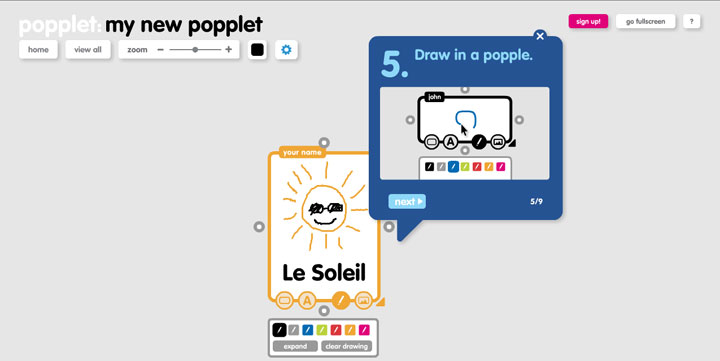 |
| Simplest interface ever. Easiest tutorial ever. Look! You can even draw in a popple! |
Some of the best aspects of Popplet are that it is truly low-cost, they have a great privacy policy, and the technology is accessible across several platforms. Students can work on their popples through a computer Web browser, on an iOS device (iPhone, iPad) or on any Android device through the corresponding apps. Popplet subscriptions can be had for as little as 50¢ per student per year depending on volume. Here's a link to Popplet's group pricing and policies: https://popplet.com/app/groups/info/ for more information.
I was especially thrilled to find that Popplet supports French-language accents (é, ç, î, etc.). Lack of support for non-Anglophone characters can be a major stumbling block in plenty of programs and applications. Even characters from Japanese, Korean and Hebrew syllabaries are supported. I am happy to recommend Popplet.com to my fellow French Immersion educators!
- Theressa
↻ BACK to TOP
Finding French-Language Simulation Games
OCTOBER 28, 2017

My previous posts have exclusively focussed on applications and games that explicitly teach French as a foreign language. That's fine and all, but my research on best practices for second or foreign language teaching using technology suggests that language acquisition can be greatly enhanced when language itself isn't necessarily the focus of lessons. Having learners complete tasks, organise information and interact in the target language is likely to result in better outcomes than by simply testing and drilling in the traditional manner. One option for allowing learners to interact and communicate in a target language within a meaningful environment is through the use of life simulation games.
There are some great games currently on the market that have French-language options built into their design. I love playing the grand-daddy of them all, The Sims. This game would not be appropriate to the classroom, unfortunately, as it obliquely references mature themes (sex, drinking) that most parents would rather not have brought up casually in class. It's also a very, very expensive game that takes up a huge amount of a computer's disc space and processing power. The app version of the game, The Sims FreePlay, also includes potentially objectionable content.

One option for creating supervised virtual campuses in Second Life, a massive online simulated world which can be operated in a number of languages, including French. There are even directions guiding teachers through the creation of their virtual classroom. While Second Life is geared to users 18 years of age and older, educators can purchase restricted areas on Second Life's servers where students aged from 13 to 17 years can explore under their teachers' supervision. These regions can cost anywhere from $150 to $600 outright, plus maintenance fees of between $75 and $295 a month. Educators must also obtain permission from their IT departments for the installation of Second Life's browser attachment.

There are a few exclusively French-language online life simulation games. One is Lil Life (yes, the name is in English!), an online community geared to children 8 years of age and up. It's a 2D simulation game set in France which even includes an Eiffel Tower. It's very text-heavy and in-game purchases are recommended to fully explore the game's features. It is also surrounded by product advertisements. I haven't found any way to limit or supervise student conversations although the site does employ moderators 24/7 to oversee chats between users. The site's administrators nonetheless recommend that parents supervise their children while online. Lil Life's privacy policy only allow users to view and to correct any information collected about them, but no mention is made of the sale of personal data to 3rd parties.

Another site, Stereopoly* is similar to Lil Life in many respects, in that users create an avatar and interact with each other. It is more of a social media portal than a simulation game, however. Users are encouraged to get virtual jobs, "marry" other users, set up house, and have children. Interactions include blowing kisses, tickling and smacking(!) each other. Instant messaging is an integral part of the site and users can send images with their messages (yikes!). I haven't found any process through which educators could supervise student interactions. Just like Lil Life, policies on personal date collected through the site are unclear.
I think it's worth mentioning that there are loads of simulation games available through Facebook. Unfortunately, registration on Facebook is limited to users 13 years of age and older. What's more, there are no built-in mechanisms for moderating private messaging between users. Students would also have to set French as their language to access games in that language (where available).
It is becoming apparent that finding affordable and appropriate life simulation games for the classroom is enough of a challenge without adding language into the mix! The better approach might to be to use simulation games of smaller scope tackling specific subjects and concepts. This web list and Jeuxdesimulation.org certainly look promising!
- Theressa
* Stereopoly is identical to two other online simulation games: Francopoly and Micropolia.
↻ BACK to TOP
My Brain Hurts!
October 27, 2017

I've been going about this blog all wrong! I was so focussed on getting my rubric nailed down that I haven't been evaluating nearly as many programs and applications as required by my professor. I also thought I had until the end of term to add evaluations.
I'm currently taking 4 courses and the content is so similar across them all that this is not the first time this has happened. It doesn't matter how often I write dates down in a calendar or add reminders on my phone. I'm struggling to keep track of all the different currents that make up the larger stream :(
I'll just have to keep plugging away and do the work regardless of whether it counts or not. The whole goal is learning, right?
- Theressa (Image sourced here.)

↻ BACK to TOP
Reflections on SECTIONS
OCTOBER 24, 2017
My classmates and I have been studying Bates and Poole's SECTIONS framework for selecting and using technology. In response, I tweaked my rubric to reflect questions posed by this framework as well as by Amanda Douglas' excellent analysis adapting the framework for elementary and secondary school teachers.
I added the three following questions to my new rubric:
- Is training required to effectively integrate this resource into the classroom?
- Does the resource have the potential to free educators to interact and collaborate with students?
- Does this resource encourage educators to adopt and/or improve upon alternative pedagogical approaches (flipped classroom, task-based learning, etc.)?
I was sorely tempted to add a question asking whether or not the resource was being considered due to its novelty or due to its potential educational value, but I couldn't figure out how to posit the question without it sounding either condescending or confusing (of course the resource is 'novel' - that's why it's being evaluated!)
- Theressa
↻ BACK to TOP
Memrise German
OCTOBER 22, 2017

A friend recommended I try another language learning app for Japanese, called Memrise. Given that I've already tackled that language with DuoLingo, I thought I'd test-drive this app by attempting another language, conversational German.
The story behind Memrise involves users trying to learn enough words to "take off" in a spaceship in that language. The app also uses plant imagery to depict whether users have mastered new vocabulary. The app uses push notifications to tell users when it's time to revise learned vocabulary.
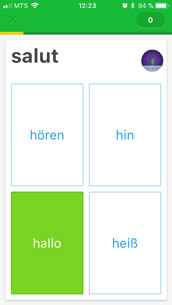 | 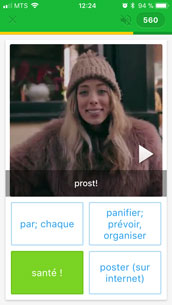 | 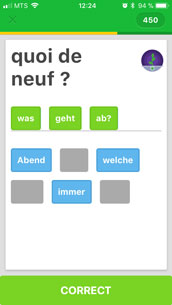 | 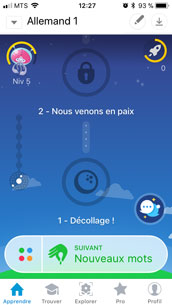 | ||||
| After a brief introduction to each word, users are soon quizzed. | Videos featuring native speakers appear throughout the app. | As in DuoLingo, users reassemble phrases from word options. | Memrise's dashboard showing user progress and goals. |
Memrise's activities are similar to DuoLingo's. There are pair matching exercises, translation and phrase-building drills. Memrise does not appear to use speech recognition in its lessons, but there are many videos peppered throughout the courses showing native speakers repeating common words and phrases. I think getting users to speak is essential, but having users listen to phrases in different contexts is pretty valuable too.
As in DuoLingo, a virtual classroom feature is available for educators wishing to create an online space for tracking student progress and for encouraging communication between students. Teachers can create a group space using their profile to link up with those of their students. Instructions for creating and managing groups can be found here. Educators can even use the Memrise database to create bespoke lessons! Their privacy policy is robust, but users from the United States who are under the age of 13 are prohibited from registering with Memrise.
The Memrise app is free to download and there are no embedded advertisements. The first few modules of each language are free, but users must subscribe to advance any further. Users may explore as many courses as they like once subscribed. The least expensive option is $43 annual fee (during promotional sales). There are also monthly and term rates. These costs could add up very quickly for the average school. Subscriptions for a single classroom of 24 students would add up to over $1000 every year! This recurring cost alone is likely to scare away most educators.
- Theressa
P.S. While Memrise lacks a speech recognition feature other reviewers have found it to be ineffective. I found Memrise's Japanese course to be much better structured than the DuoLingo course. I was much less likely to get frustrated with the pace of lessons or bored by their repetitiveness. Does that mean I'm willing to pay $43 dollars for Memrise, though?
↻ BACK to TOP
DuoLingo Japanese
OCTOBER 17, 2017

I'm supposed to be researching and evaluating applications and programs I would like to integrate in my classroom. I find it difficult to evaluate courses teaching French, however, since I already speak the language fluently. Instead, I prefer to attempt courses in a language that is unfamiliar to me, to see if the structure and interface are truly user-friendly for novices. This is the main reason why I have decide to evaluate DuoLingo's new Japanese course for native English speakers.
DuoLingo is a language-learning app that is accessible across multiple platforms. Users can log onto their profiles and lessons on any iOS (iPhone) or Android device, including smartphones and tablets. Depending on the language being studied, many users can also follow lessons on a computer by going to DuoLingo's website at DuoLingo.com. Not all lessons have been ported to the website, however. Japanese is not currently available through my browser, for example.
An owl named Duo is the user's guide throughout the application. Users starting the app are asked if they have any Japanese language skills. The big surprise is that they'll be using the Japanese syllabary or “kana”. The user is rarely able to lean on their native-language skills during lessons as a result.
 | 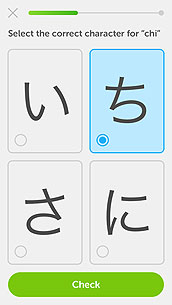 | 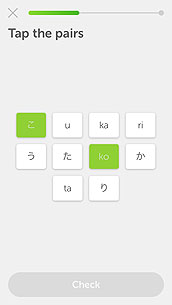 | 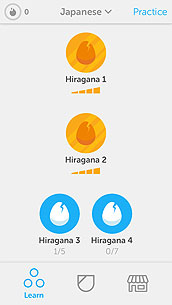 | ||||
| Duo's placement test. | Listening to kana and picking out the correct one. | Correct answers are green, incorrect ones are red. | Users must unlock each new level but are free to revisit old ones. |
Progress can be slow with this approach, unfortunately, and users are easily overwhelmed, particularly when new kana are introduced unexpectedly midway through a module. This definitely affects the user's engagement and motivation. Fun features, such as earning points to dress up Duo, are very limited. It's possible that those features are now only available to subscribers.
Speech recognition - a great feature in other versions of DuoLingo courses - is unavailable in the Japanese version. Speech recognition was an excellent learning tool that really took advantage of smartphone and laptop functionalities in DuoLingo's other courses. It is sorely missed in this case.
Help items are always underlined and audio files can be replayed as often as necessary. Feedback usually consists of red text boxes providing the correct answer. DuoLingo tracks failures and presents users with plenty of opportunities to get the answer right within a module.
There are options for helping educators wishing to use this tool in the classroom. Through the DuoLingo for Schools interface, teachers can use their profile to create virtual classrooms their students can then join. There, the teacher can track student progress, moderate discussions and filter out mature themes. Users can practice the target language with their classmates or with other users in online clubs. Teachers may grant or revoke student access to said clubs. DuoLingo does not sell profile data and users can completely erase their profile and data at any time.
DuoLingo profiles and lessons are absolutely free, with an important caveat: Unless users upgrade to a premium account they will see local advertisements at the end of every module. Schools considering this app would have to weigh the pros and cons of exposing their students to advertisements.
DuoLingo's strengths are its short activity length, spaced practices and revisions, and typically gradual approach to tackling new vocabulary words and concepts. In most versions of DuoLingo, users are encouraged to speak the target language and have their efforts evaluated either by the software or through interactions with other users. On the downside, the language drills can feel repetitive and users must be intrinsically motivated to complete modules. The fun, more exploratory rewards and activities are limited, at least in the free version of the application.
This app is best suited to users with strong native-language reading skills. Anyone under the age of 10 or so would likely find these activities boring and perhaps frustrating, due to the amount of typing required and the repetitiveness of the activities. DuoLingo would be an appropriate choice for language lessons, as well as for Social Studies courses, as an adjunct to more stimulating projects and classwork.
- Theressa

P.S. Duolingo has developed an ancillary app called TinyCards to supplement its courses. These are little more than digital flashcard sets. They are handy as a revision tool, and that's about it. The biggest feature of TinyCards is that educators can create their own custom decks if they so desire.
↻ BACK to TOP
Rubric Version 4.0...
OCTOBER 16, 2017

I finally have a half-decent assessment tool. It's not perfect, but it's a start. Versions 2.0 and 3.0 weren't fit for public consumption.
The core of the tool is largely based on Michael Allen's recommendations for e-learning design with sections evaluating the context of the activities, the challenges presented as well as feedback proffered. A large section deals with social considerations (cultural sensitivity, violence, privacy policies, etc.) Another is devoted to identifying grade levels and subjects for which an application is best suited. Practical considerations, such as costs, cross-platform compatibility and printed materials are also part of the rubric.
After all the work I did on researching e-learning approaches and methodologies, I may pare down certain elements to make way for frameworks to help educators assess the applicability of certain technologies to the cognitive development of their students.
For now, at least, I feel ready to test this rubric out on a couple of apps.
- Theressa
↻ BACK to TOP
All Hail Michael Allen!
OCTOBER 5, 2017

While taking a full load of courses makes my head spin sometimes, the benefits far outweigh the drawbacks. The biggest benefit has been drawing from other courses and their accompanying materials to help contextualize my understanding of software assessment. I mean, how can I reasonably evaluate software without knowing anything about instructional design?
I've been assigned a LOT of reading in my Web-Based Learning course (looking at you Dr. Janes!) My favourite author so far has been Michael Allen. He's been studying and practicing instructional design for decades. You can find his website here: alleninteractions.com.
Mr. Allen has written a series of e-learning design books. They are available on his website and many of the books are also available on amazon.ca. His writing style is accessible and it's peppered throughout with exercises, allegories and graphical elements demonstrating important concepts. If his software is anything like his books, Mr. Allen clearly knows what he's doing.
Thanks to Mr. Allen and the other material I've read in my Web based learning course, I'm ready to redesign my software evaluation rubric and to test it out. I realise now that the rubric I had designed (which was largely based on personal hunches and rubrics I had found elsewhere) was often teacher-centred rather than learner-centred. While it's true that software does need to meet curricular and educator needs, that doesn't matter a whit if learners DON'T LIKE USING THE SOFTWARE!
My new rubric will be heavily learner-focussed and I am building it around Michael Allen's teachings. Of course, there will still be sections in the evaluation regarding curricular learning outcomes, financial considerations, and questions about social bias and stereotyping in the content.
Otherwise, the rubric will focus on meeting learners' needs by assessing software according to four basic precepts of good instructional design:
- Does the application feature a meaningful, motivating and memorable context?
- Are learners challenged by the content without becoming frustrated?
- Do learners know what they need to do to successfully accomplish each activity?
- Do learners get feedback that allows them to move forward and is help available when they need it?
See you soon. For now it's back to the drawing board! - Theressa
↻ BACK to TOP
EazySpeak French: An Oldie but a Goodie!
SEPTEMBER 20, 2017

As a French Immersion teacher, I was constantly frustrated by the lack of resources targeting children learning French as a second language. There are plenty of great resources out there if you're a literate traveler, however. I'm personally very fond of DuoLingo, an app I have used to learn conversational Spanish and Italian.
Great as DuoLingo is, it requires a user with strong reading and writing skills. DuoLingo's interface is very simple and uncluttered, but it's clearly geared toward adults, and the phrases and subjects it tackles reflect their users' needs and interests. So what's out there for younger students, the ones who would get bored and frustrated by endless drills related to clothes shopping and verb tenses?
DESCRIPTION
I stumbled upon a funny little program several years ago. It's called EazySpeak French by Kutoka. It's nearly obsolete now (it is no longer available for PC operating systems past Windows 7) but you can nonetheless still buy it on amazon.com.
The reviews for EazySpeak are middling - deservedly so. The program features mostly embedded Adobe Flash videos (remember those?) and you have to download a bunch of patches after installation to make it load correctly. The iOS version is notoriously unstable. Navigation is confusing and you're not always sure how to get to where you want to go.
So why did I love using it with my students? It's FUN! Here's a great example. Learning the days of the week and the names of months can be tedious in French. In the elementary levels, we typically spend kindergarten through grade 1 reciting them daily. This game can't replace that kind of rote memorization, but it does help the students to recall and to read the dates later on - by breaking a prisoner out of jail!

Most kids get a thrill out of simulated rule-breaking, so this game was always a hit in class. Earlier in the game, they had helped the burglar break into a bank vault (they had to listen to numbers in French to find the combination.) In this activity, the students had to listen closely to the audio prompt of the date before entering their selections. If they got the right answer, the prisoner dug his way out of jail. Those students who chose not to break him out were still reading the names to make sure they didn't hit on the correct answer. Those students were rewarded by watching the prisoner grow long hair and a smelly beard. Either way, they were working on recognizing and identifying the dates they had just heard. Both options resulted in learning!
Another very popular sub-game was rather limited in scope, but memorable regardless. In it, students had to figure out whether or not the shopper's friend liked the outfit he or she was trying on at the moment. The animations indicated either that the friend loved, liked, didn't like or detested the outfit. If the outfit was truly horrible, the friend vomited.
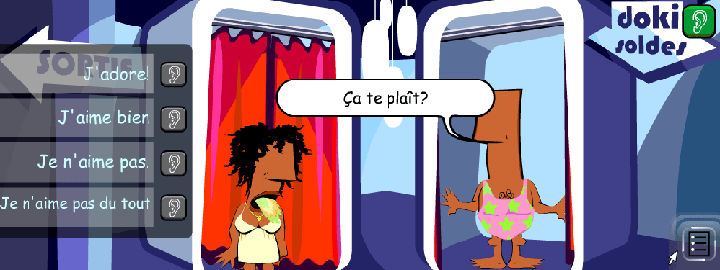
This activity wasn't as well built, since the answers were never shuffled, allowing students to memorize the phrases and their order instead of reading through them. An even better idea would have been to make the friend state their answer audibly, without giving any visual cues, then allow the student to read the responses. Clicking on the correct phrase would then trigger the animation. The lesson from this activity (from a web design perspective) is that toilet humour pays off with little ones!
One of the better-designed activities involved picking suspects out from a line-up. Students had the option of learning the terms for identifying characteristics earlier in the game (such as green eyes, thin, old, red hair, etc.) before testing out their skills. The reward was a horrified reaction from the suspect and snarky giggles from the rest of them.

EVALUATION
I evaluated this program using my rubric (see post from September 19). It would seem that its cumbersome navigation is its biggest flaw. The program opens in two stacked windows. The top one looks like this:

It's VERY busy! Using images to convey concepts isn't a bad idea. You might want to try the 'hospital' to learn about health and body parts, for example. But I can't always tell what each image is portraying as the graphic design team got carried away stylistically. The clutter and the loud and varied pallet are hard on the eyes too.
The lower navigation window provides explanations of the lessons available in each 'building', but the bottom window can be closed, leaving the user fumbling about, trying to figure out where to learn about numbers. Do you learn numbers at the bank? Or on that building with the numbers on it? What is that building supposed to be anyway? Vincent Flanders, creator of webpagesthatsuck.com, calls this 'mystery meat navigation' because (just like Spam) you're not really sure exactly what you are about to consume. Poor navigation wastes users' time and can frustrate them enough that they will abandon a program or website.
One aspect I haven't evaluated, and one that I should perhaps add to my rubric, is that of cultural sensitivity. Is this product free of biases and stereotypes against women, religious groups, racial or ethnic groups, or people with disabilities? Are all sorts of people represented in the game? I will be revisiting my rubric over this and other issues.
REFLECTION
While not the best language-learning software ever, EazySpeak's sense of humour, attention to small details and slightly subversive attitude made it an appealing option for the kids who had grown up with SpongeBob Squarepants. Designers often underestimate the sophistication of young kids (they all knew what a police line-up was, for example) and tools that are developed for them often reflect this attitude.
I have pointed out some of this game's more glaring deficiencies. There are still some very important lessons to be gleaned from it:
- Have a sense of humour! Learning can - and should - be fun!
- Don't underestimate the sophistication of your audience. They're usually more capable than you think. People usually prefer material that isn't condescending.
- Try to have activities where learning happens regardless of an activity's outcome. The students who didn't want to break the prisoner out of jail worked very hard to make sure their answers were incorrect. In the meantime, they were listening to the audio prompts to make sure they were “wrong”.
- A little potty humour never hurt anyone. :)
- Theressa
↻ BACK to TOP
Finding Resources for French as a Second Language Students
SEPTEMBER 19, 2017
In my experience, teachers of my generation and younger are typically quick to embrace digital teaching tools, whether they be in the form of online games, standalone software, media files or hardware (such as Smart or Mimio boards.) Educators in English-language institutions are particularly fortunate, since so many developers focus on the huge market currently available to them in the largely anglophone populations of the United States, Great Britain, Australia, Canada and elsewhere. But it's not just native speakers who are rushing to check out the latest programs, websites and tools on offer. Learners from all over the world are eager to master what is currently the lingua franca of global trade.
Sadly, this is not the case for French-language materials. The market for francophone websites, software and other tools is somewhat limited, largely due to the relatively smaller population of francophones worldwide. What's more, products tend to be geared toward native French speakers in France or Quebec.
The tools that are currently available to French as a Second Language (FSL) students often cater to travelers, and therefore focus on vocabularly and situtations particular to their specific needs (ordering from a menu, for example.) Accessible francophone tools that cater to FSL students can be few and far between.
I plan to showcase the resources that I have discovered over my years of teaching in the French Immersion system. I will also be seeking out the latest digital tools as they become available.
I will evaluate each website, app or program according to the following criteria. I WILL be revisiting, adapting and editing this rubric as I become aware of its deficiencies.
| EDUCATIONAL VALUE - The material... | |
| 1) addresses the target user's goals/needs. | • always • usually • sometimes • rarely |
| 2) is appropriate to the age level of the user. | • always • usually • sometimes • rarely |
| 3) uses language the user can understand. | • always • usually • sometimes • rarely |
| 4) develops problem-solving skills. | • always • usually • sometimes • rarely |
| 5) encourages creativity. | • always • usually • sometimes • rarely |
| 6) promotes independent learning. | • always • usually • sometimes • rarely |
| 7) builds on the user's prior knowledge. | • always • usually • sometimes • rarely |
| 8) develops problem-solving skills. | • always • usually • sometimes • rarely |
| 8) accommodates a variety of skill levels. | • always • usually • sometimes • rarely |
CONTENT - The material... | |
| 1) is current. | • always • usually • sometimes • rarely |
| 2) is factually correct. | • always • usually • sometimes • rarely |
| 3) is ordered logically. | • always • usually • sometimes • rarely |
| 4) exhibits correct spelling and grammar. | • always • usually • sometimes • rarely |
| 5) reflects the user's community and environment. | • always • usually • sometimes • rarely |
INTERFACE - The user interface... | |
| 1) is easy to navigate. | • always • usually • sometimes • rarely |
| 2) has consistent navigation | • always • usually • sometimes • rarely |
| 3) features a design target users find appealing. | • always • usually • sometimes • rarely |
| 4) is uncluttered. | • always • usually • sometimes • rarely |
| 5) is accessible to users with disabilities. | • always • usually • sometimes • rarely |
| 6) uses images appropriately. | • always • usually • sometimes • rarely |
| 7) uses audio appropriately. | • always • usually • sometimes • rarely |
| 8) uses video appropriately. | • always • usually • sometimes • rarely |
| 9) allows the user to control multimedia playback. | • always • usually • sometimes • rarely |
SUPPORT - The tool... |
|
| 1) includes navigation aids. | • always • usually • sometimes • rarely |
| 1) includes a help menu, directions or a support database. | • always • usually • sometimes • rarely |
| 2) includes tutorials. | • always • usually • sometimes • rarely |
| 3) allows users to change the difficulty level. | • always • usually • sometimes • rarely |
| 4) allows users to exit a given activity at any time. | • always • usually • sometimes • rarely |
| 4) tracks and saves user progress. | • always • usually • sometimes • rarely |
I won't know if this rubric is effective until I try it out. I'm quite certain that changes will be made.
I looked at several evaluation tools while preparing this rubric. The most illuminating and comprehensive one (by far) is a guide developed by the Prince Edward Island Department of Education. You can find it at www.gov.pe.ca/photos/original/ed_ESLR_08.pdf. In the appendices there are tools for evaluating everything from DVDs to applications to websites. There are even tools for student-led website assessments.
- Theressa