



GRAPHISMA ›› MAÎTRISE / MASTERS
blogue : projets / blog : projects
IB STUDIES: INTERDISCIPLINARY LEARNING & ASSESSMENT
April 20, 2019
 I am very pleased with the content and the progression of the University of Windsor's International Educator Certificate for IB programme thus far. My first course last fall was an excellent introduction to inquiry-based learning, but I found it hard to wrap my head around the structure of the IB curriculum. My last two courses effectively clarified that structure and dispelled a few misconceptions I had about the individual programmes.
The winter term was spent studying the IB curriculum in greater detail, specifically interdisciplinary learning in the Middle Years Programme (MYP). My partner, Rebecca Klein, and I developed an interdisciplinary learning unit blending Visual Arts (my chosen field for this project) and Drama. Click on the link to view a PDF of our final Interdisciplnary Unit Plan.
My other course was on effective assessment techniques. This course reinforced my curricular studies while providing me with an overview of assessment approaches across the IB continuum. Click on the link to view my Final Assessment Design. I have also created a Google slideshow covering the design with links to all supporting documents.

↑ BACK to TOP
F2L: MORE THAN AN E-REPOSITORY
December 14, 2018
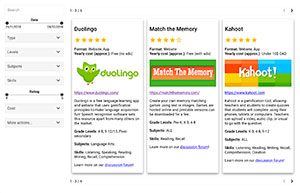 As a French Immersion teacher, I have often been frustrated when attempting to identify engaging digital resources for use in my classroom. I will sometimes spend hours sifting through Anglophone Web tools in order to find something pertinent to a French language lesson. As a result, I have long dreamed of creating a searchable online repository for non-ELA second language educators. My latest project is a first attempt at building such an e-repository.
My partner, Matthew Ledwell, and I collaborated to explore different design solutions for connecting French Immersion teachers with appropriate digital resources. Mr. Ledwell built discussion boards and explored social media options while I focused on designing a crowd-sourced e-repository.
In the end, it was decided that no one solution was effective on its own. We therefore created a website that harnessed the easy searchability of an e-repository with the in-depth exploration afforded by discussion forums. Social media, in turn, is used to drive traffic to and generate interest in the Web site. Each solution enhanced the other.
Link to Prototype F2L Website (with embedded e-repository and discussion boards
Link to Situated Group Design Challenge Essay (background on the project)
Link to Draft F2L E-Repository
Link to Online F2L Resource Submission Form
↑ BACK to TOP
I.B. LESSON: STREET ART
December 5, 2018
 This is the final assignment for my first International Baccalaureate (I.B.) certification course. I had to dive deep into ibo.org's documentation in order to create an MYP / Grade 8 lesson on street art. I also had to rethink my approach toward lesson planning by properly structuring classroom discussions in order to make them student-centred.
Link to Street Art Lesson Plan Link to Street Art Lesson Presentation
↑ BACK to TOP
MOBILE LEARNING IN K-12 CLASSROOMS
November 25, 2018
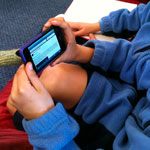 My latest graduate course explored issues and trends in educational technologies. The course was excellent for two reasons: Not only did my professor understand and harness the power of online learning modalities, but he also forced me to reconsider a lot of previously cherished beliefs surrounding technologies.
For example, I think it's pretty clear that mobile devices will become increasingly common in public K-12 education, likely through blended or hybrid classroom models. My first reflective essay on mobile learning discusses the benefits and challenges presented by the integration of mobile devices in the classroom.
Once we began studying mobile learning in the course however, I learned that there is ongoing pushback from educators (including my classmates) and institutions that see mobile devices as distracting and even dangerous. I therefore decided to explore mobile device bans for my second reflective essay. I was very surprised by the results of existing research into the topic!
Links:
TFrancois_Reflection_Paper_01.pdf (General Discussion of Mobile Learning)
TFrancois_Reflection_Paper_02.pdf (Mobile Device Bans in K-12 Institutions)
↑ BACK to TOP
I.B. PLANNING IN CONTEXT
October 27, 2018
 This planning in context assignment was the product of my first reading of the International Baccalaureate (I.B.) Middle Years programme. I based the lesson around a New York Times article discussing a Brazilian art exhibition centred around Afro-Atlantic history. North American audiences don't often learn about history or art from either a South American or an African perspective, so I thought this exhibition would lend itself well to an international curriculum.
The lesson is a rough draft, but I'm pleased with my initial ideas. It could potentially be fleshed out to form the core of an entire Visual Arts or History unit, if necessary.
Link: Planning_in_Context.pdf
↑ BACK to TOP
REDESIGNED PHONEMIC AWARENESS PROJECT
Le 3 août 2018 / August 3, 2018
 In response to my professor's feedback I completely rebuilt my phonemic awareness toolkit. It is now hosted at: ABC/index.html. This version is more complete and it includes much more feedback as well as tools for tracking user progress. I have also created an accompanying Course Manager's Manual for the module. The next step will be to test the tool with students and to seek comments and ideas for improvement from my colleagues.
NB: The module is not yet mobile-compatible. I am hoping to develop a matching app for mobile users.
↑ BACK to TOP
DRAFT PHONEMIC AWARENESS ACTIVITIES
Le 2 juillet 2018 / July 2, 2018
 I just completed a sample interactive learning module for young French second language students. You can find it at TFrancois_6822/index.html. The biggest challenge was to create activities and an interface that didn't require advanced reading skills. I'm looking forward to rebuilding it however, improving it, and adding missing activities. Plus, I learned how to use Adobe Captivate!
NB: The module is not yet mobile-compatible.
↑ BACK to TOP
INSTRUCTIONAL DESIGN for SECOND and FOREIGN LANGUAGE ACQUISITION
April 12, 2018
This is a video of my final presentation for my course on Instructional Design and Information Technology. In it, I outline best practices for educators teaching second and foreign language learners. You can download the accompanying paper here: TFrancois_5103_ID_for_SLA.pdf
↑ BACK to TOP
PLANNING A TERM CAN BE FUN - WHO KNEW?
April 8, 2018
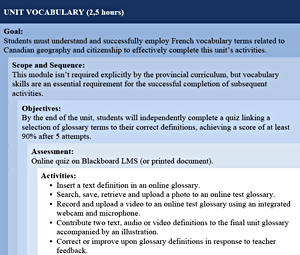 Teaching in a second language can be tough, especially in the humanities. I carefully organized the assignments in this blended delivery Grade 4 Social Studies unit plan to reflect my students' need for an explanation of basic French vocabulary terms before jumping into higher-order concepts, such as citizenship. I also allowed for multiple options for students to share their knowledge, such as video recording, plastic arts, or contributing to an online discussion. Although I used ICT liberally in this unit plan, I made sure to build in paper-based options, just in case.
↑ BACK to TOP
TECHNOLOGY PLANNING for the CLASSROOM
April 8, 2018
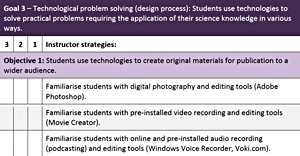 In this classroom-level technology plan, I answer the following questions: “How will I use technology in my classroom? What equipment will I need for implementation? How much will it cost? What is the timeline for full rollout? Am I trained and ready to integrate ICT effectively? How do I ensure that my plan is reaching its objectives and meeting stakeholder needs?”
A technology plan can be at the classroom level (as in this case), it can cover an institution, or even an entire school division or district. It's the best way of ensuring that precious resources aren't wasted on ineffective or (worse) unwanted ICT.
↑ BACK to TOP
ADULT SECOND and FOREIGN LANGUAGE ACQUISITION
April 3, 2018
I took a course on adult learning theory out of sheer curiosity. Are adult learners really that different from children and youth? Yes, and no. On the one hand, adults usually have many more demands on their free time than children, they pursue education for different reasons, they tend to be more resistant to change, and they have a wealth of accumulated experience upon which to draw. On the other hand, both groups are more motivated to learn by content that is meaningful to them, both are goal-oriented, they all enjoy problem-solving, and both groups thrive when intellectually challenged within a supportive environment.
In my paper (TFrancois_6802_Adult_SLA.pdf), I review the major strands of language acquisition theory, and what research suggests educators can do to best meet adult second and foreign language learner needs. I was surprised by some of the recurrent themes, such as the desire for community and for belonging. The importance of cultural competency and sensitivity - on behalf of teachers and students alike - also can not be stressed enough.
↑ BACK to TOP
STANDARDS ASSESSMENT for ICT INTEGRATION
March 11, 2018
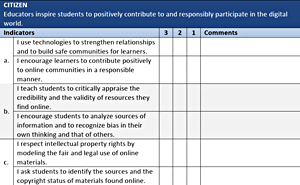 Moving toward a connected classroom - particularly blended or hybrid teaching models - requires careful planning. I created this Standards Assessment Plan to help educators assess their own readiness to integrate technologies in the classroom. It is adapted from the ISTE (International Society for Technology in Education) Standards for Teachers as well as elements from those for administrators and for students.
Just as importantly, the plan also assesses institutional readiness and the availibility of educator supports, such as mentors, online networks, and professional learning communities (PLCs) when integrating educational technologies. It is an important component of a technology plan at the classroom, institutional, or divisional/district levels.
↑ BACK to TOP
A FIRST ATTEMPT at PLANNING BLENDED/HYBRID TEACHING
February 11, 2018
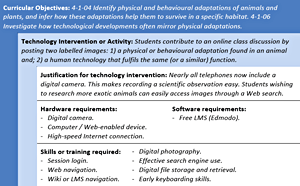 I had a lot of fun creating this Lesson Plan for an entire term of blended/hybrid Grade 4 Science classes. The exercise forced me to make concrete decisions regarding the digital tools and the resources I would include and how these tools would actually help to meet curricular learning objectives.
While this plan represents an ideal scenario for ICT integration, the reality in the classroom is that devices break, the WiFi is sometimes sluggish, or another teacher has booked the laptop cart for the forseeable future. My subsequent unit plan includes plenty of paper-based and traditional alternatives as a precaution against technological breakdowns.
↑ BACK to TOP
ABCD OBJECTIVES EXPLAINED
January 26, 2018
One of my biggest frustrations when teaching is dealing with vague or incomplete learning objectives (a.k.a. learning outcomes). “Students will use appropriate vocabulary related to their investigations of habitats and communities” is one example from my province's curriculum. Okay... where is the list of vocabulary terms? How many terms should they be using? Is 80% okay? Should they be able to define the terms, or do they just need to recall them? The list of questions goes on and on...
One of the most useful skills I've learned during my masters studies is that of proper objective writing. My favourite model is the ABCD method of objective writing:
- A = Audience of instruction (e.g. Grade 3 students.)
- B = Behaviour of performance to evaluate (what is the desired learning outcome? E.g. Students will complete a test on Canadian provincial and territorial boundaries.)
- C = Conditions (under what conditions must performance occur? E.g. Students will complete the test before the end of term, and they will not have access to any visual aids during the test.)
- D = Degree of performance (what are the standards for acceptable performance? E.g. Students must achieve a grade of 80% or greater after two attempts.)
Put them all together, and your ABCD objective might look like this: “By the end of term (C), grade 3 students (A) will be expected to complete a test on Canadian provincial and territorial boundaries (B) achieving a score of at least 80% after two attempts (D) without the use of visual aids or reminders (C).”
Properly-written objectives clearly describe the behaviours students should exhibit following instruction. They simplify instruction and assessment for educators all while clarifying expectations for students. WIN-WIN!
BONUS: Here's a link to a YouTube video explaining ABCD - one of my professors used it in an Instructional Design course: https://www.youtube.com/watch?v=6b9ahqnC8Xc
↑ BACK to TOP
WHAT IS AN INSTRUCTIONAL DESIGNER?
January 18, 2018
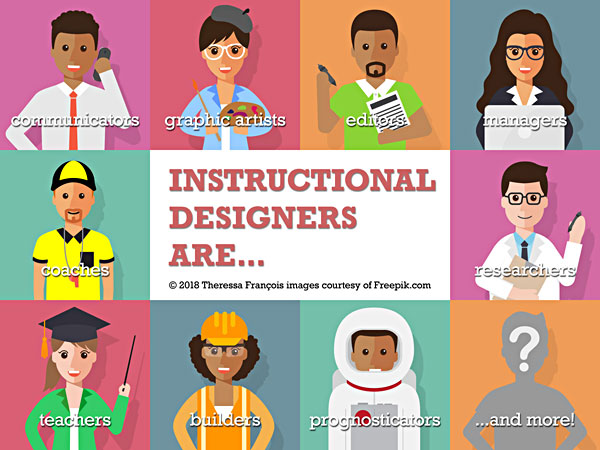 I created this poster early on in my first instructional design course. When I created it, I had a limited understanding of instructional designer. It seemed as though instructional designers had to do everything!
Now that I'm on my second ID course, it appears as though I was right - instructional designers must be flexible, multitalented professionals who fill whatever role is required of them. Sounds like my kind of job!
↑ BACK to TOP
MAKERSPACES FOR ALL
December 1, 2017
This is my Makerspace presentation. Not only did I have to learn about Makerspaces, but I had to create a proposal convincing my school we should build one, too. Now that I've studied them, I'm convinced too! It's a great tool that's adaptable to so many subjects and themes. Below is a video of the Powerpoint presentation I made. If you prefer a nice, quiet read, you can download the annotated slides instead.
↑ BACK to TOP
ARCC FRAMEWORK for SELECTING ICT in SECOND LANGUAGE INSTRUCTION
NOVEMBER 26, 2017
I'm very excited to present a framework I developed as part of my Genius Hour assignment! It's called ARCC, and it's meant to help second and foreign language eductors choose ICT tools. The idea is that educators shouldn't necessarily choose a resource based on its treatment of language, but rather on the quality of the target-language interactions it encourages in students. ICT doesn't even have to be translated into the target language, just so long as it gets the students using it to communicate!
The framework looks like this:
A | Absorb: Students absorb new vocabulary through listening and viewing. | Examples: Videos, songs and audiobooks, non-educational video games featuring plenty of dialogue. |
R | Recall: Students repeat new vocabulary and phrases, without necessarily fully understanding their structure or appropriate uses. | Examples: Matching drills, electronic flashcards, word searches, many language learning applications and programs. |
C | Comprehend: Students understand input from the target language and can answer questions in that language independently. | Examples: Content-based tests, target language quizzes, puzzles with specific outcomes, simulations, language applications requiring phrase translation and sentence assembly. |
C | Create: Students share ideas and explore concepts using the target language. | Examples: Writing emails, blogging, video and audio creation and editing, social media posts in the target language. |
Here's a video explaining my framework. I'm speaking very quickly because I had a time limit of 5 minutes. If you don't feel like sitting through my video, you can download and read my presentation paper instead.
↑ BACK to TOP
SERENDIPITY in the DEPARTURE LOUNGE
November 13, 2017
Yesterday, while waiting in the departure lounge for my flight to board, my husband's colleague stopped by to chat. He was exploring options for launching an open LMS (Learning Management System) that would encourage mentorship and peer networking globally at his institution, while still offering courses and professional development opportunities to members. He felt that their current LMS was inadequate, but he wasn't sure what they needed to do to encourage accessibility, visibility, timeliness and pertinence in this new system.
While I'm hardly an expert at this point, I offered the following recommendations to bring back to the institution's steering committee:
- Allow members to create content. Let go of the notion that every item on the site has to be approved and vetted by a committee. Include 'certified' content, by all means, but keeping up with the needs and interests of users around the globe is impossible without a significant outlay of time and money.
- Prioritise approval and verification of users instead of their content. Verified users are unlikely to risk their professional necks by posting spam or offensive content.
- Allow users to rate each others' posts and flag any inappropriate content. Members are then given a rating based on the content they've posted. Members with higher ratings are considered 'experts' within their domains and are more likely to be sought out for advice or as mentors.
- Create a robust tagging function. Encourage posters to tag by field and subject matter, and create an algorithm that automatically tags posts by title and date posted.
- Allow members to create profiles and give them the power to curate the content that appears within their feeds by having them select the tags that are of interest to them.
- Provide a forum on each profile where users can respond to other members' questions without having to direct message or email each other. Allow members the option of deleting objectionable or dated forum posts.
- Build a robust search function into the system. Allow users to easily add and remove whatever filters they see fit to quickly zero in on pertinent content. This search function depends on good tagging etiquette to function properly (see #4).
- Do not assume that 'if you build it, people will come'. Publicise the EPSS at least until it has enough members to be self-sustaining. Keep a high profile in forums where potential members are likely to congregate and encourage them to join.
- Remind members to submit and to rate content (don't bug them too often, though) to keep the system timely. Hire extra people at first, or organise employees to submit quality content regularly, if necessary. Nothing kills a KM or EPSS like dated content
In a nutshell, I would suggest that this institution position itself as a content enabler and curator, rather than strictly a content provider.
↑ BACK to TOP
IS THERE a DEARTH of FRENCH LANGUAGE RESOURCES?
January 18, 2018
I created this Powerpoint as part of a course discussing research in computers. It explains how difficult it can be for French Immersion and French Second Language teachers to find accesible Francophone resources online.
↑ BACK to TOP
PARADIGM SHIFTING IN 3... 2... 1...
November 5, 2017
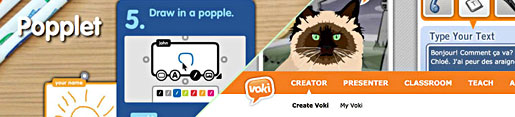
I'm only just realising that I have tended to think of educational design (and lesson planning) in rather narrow terms: It was my job to design a very specific path and it was my students' job to follow it. Our activity design challenge forced me out of that mindset.
After exploring Voki.com, Popplet.com and truly absorbing the lessons from this and other courses this term, I've come to understand that the best learning activities occur when students are free to choose - or better yet - create their own path. It doesn't much matter how you get to the destination so long as you arrive!
That means I have to resist overdesigning activities and forcing students to perform tasks in the exact same way. I need to create learning landscapes instead, where the students are provided with the tools to successfully complete objectives in a way that makes the most sense to THEM.
Whether or not I go back to a regular classroom, my approach to teaching has been profoundly altered.
↑ BACK to TOP
SOCIAL MEDIA - HOW DO WE HARNESS THIS?
November 5, 2017
I posted the following message (slightly edited) in the course discussions. I'm duplicating here as well as some suggestions made by classmates because I don't want to lose them when the course ends!
It seems as though every expert in education and instructional technology is saying the same thing: The world is changing and traditional teaching methods won't cut it anymore. But exactly how are educators supposed to best harness the power of social media to improve pedagogy? It would seem that SM's biggest strength is in its ability to motivate learners to contribute to a conversation and to facilitate communication and collaboration on a global scale. So how are teachers supposed to harness that power in the classroom?
A quick Google search for "how to use social media in your classroom" netted some practical ideas: (this is hardly a comprehensive list)
www.edutopia.org/blog/guidebook-social-media-in-classroom-vicki-davis
www.teacherswithapps.com/10-great-ways-to-use-social-media-in-classroom/
www.edudemic.com/how-to-use-social-media-as-a-learning-tool-in-the-classroom/
My favourite ideas from the sites:
- Ask students to blog
- Create a classroom Facebook account and connect with other classes
- Skype around the world
- Host a podcast or YouTube channel
- Create a Flickr photo project
- Tweet or post status updates as a class
- Brainstorm with Pinterest
- Create a class Wiki
UPDATE! One of my classmates responded with the following suggestion:
Here’s the link to the eLearning article “How To Use Blogs In the Classroom”, it has great tips for starting a blog in your classroom. https://elearningindustry.com/how-to-use-blogs-in-the-classroom
Has anyone used edublogs? (https://edublogs.org/) - A. Leblanc
↑ BACK to TOP
THIS IS WHAT an eREPOSITORY SHOULD LOOK LIKE!
September 26, 2017
One of my assignments was to research digital repositories - websites where educators can access, exchange and curate educational materials. Some repositories also feature platforms for peer-to-peer networking and professional development opportunities. One of the assigned websites was PBSLearningMedia.org:

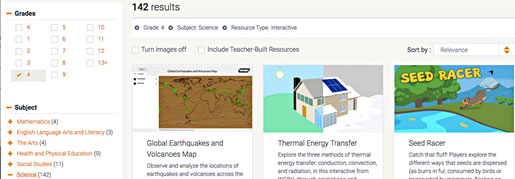
THIS is what I want to do for French Immersion educators and learners! The interface is intuitive and the material is easily searchable. You can limit results by grade, by subject matter and by media type. Users can even further refine results by choosing unit themes or by including resources created by other teachers:
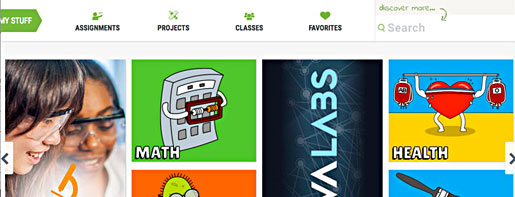
One of the best features, in my opinion, is the student version of the site. It is visually appealing, sure, but more importantly, it allows students to access many of the same materials as their teachers, but organised and presented in a way that is more pertinent to them. What's more, students can complete assignments online (which must mean that teachers can organise an online classroom through this site), join classrooms and bookmark favourite resources:
PBS did not create all the materials offered on the website. They have partnered with a number of established and trusted content creators (such as NOVA, Masterpiece, The Kratt Brothers, Frontline and Ken Burns, among others.) They also accept and vet materials created by educators, augmenting the number of resources available to classroom teachers and their students.
Insights gained from studying this website:
■ I don't have to create everything myself! There are already some good resources out there for French-language students, but they're spread out over many different websites. Partnering with existing developers would be an excellent way of augmenting resources on the repository I plan on building. TFO (the Ontario French-language television channel) has a section on PBSLearningMedia.com with videos presenting the letters of the alphabet and a few vocabulary words in French.
■ Materials must be properly organised and easily searchable. PBSLearningMedia has a robust system for seeking out resources based on grade level, subject and type. Once these are selected, educators have still more options for narrowing search results by unit theme and even further still. The materials on my repository must be properly tagged to ensure that users can find them according to a variety of search terms and categories.
■ Curate the resources! When hunting for quality educational media online, there are few things more frustrating than having to wade through page after page of mediocre or buggy materials to find something useful. The repository for the Mimio whiteboard application is like this as was the repository at a school division where I once worked. I avoided both unless I was desperate for ideas. PBSLearningMedia have clearly taken the time to ensure that only the best quality, most pertinent resources have been retained.
■ You can have the same database of resources, but present them differently for different audiences. PBSLearningMedia.org has taken the differing needs of educators and students into account by creating two different landing pages and search mechanisms for each group. The teacher website is all about finding media quickly. The student version is more about exploring and having fun. When I build a repository, I will want to include a section for francophone and francophile parents as well as for educators and students.
↑ BACK to TOP
ACCESS TO ARCHIVES
This is only a sampling of my blog posts. To see more,please visit www.graphisma.com/adventures/.
↑ BACK to TOP
accueil / home | interactif / interactive | 2D | 3D | analogique / analog | maîtrise / masters